
How to Convert RAW Files Online in 3 Easy Steps
Follow these three simple steps to convert RAW photos. No software installation required. Free and secure.

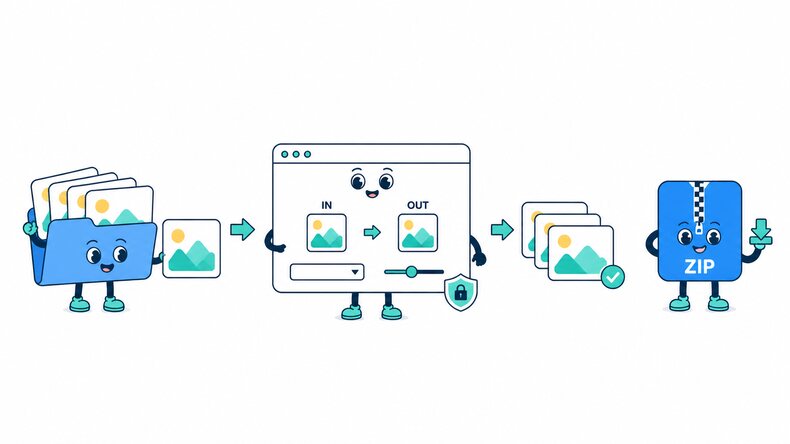
Add RAW Files
Select RAW photos from your device, choose a folder, or drag and drop files into the browser.

Choose the Output Format
JPG is selected by default. Choose PNG, WebP, TIFF, or another supported format and adjust the quality if needed.

Convert and Download
Start the conversion, check the completed results and file sizes, then download images individually or together as a ZIP file.
How Does the RAW Converter Work?
The CompressFly RAW converter attempts to decode camera files such as CR2, CR3, NEF, NRW, ARW, DNG, RAF, and RW2 directly in your browser, then writes the available image to the selected JPG, PNG, WebP, TIFF, or other supported output. Because this page accepts files from many camera families, decoder support varies by camera model and RAW variant. A result may be rendered from decoded RAW data or an embedded preview stored in the source file.
A listed extension indicates that the converter will attempt the file; it cannot guarantee that every camera-specific variation will decode. Keep the original RAW and inspect the converted dimensions, orientation, color, transparency where relevant, and fine detail before using the output. Files are processed locally, individually or in bulk, with no server upload or signup required.
What "in your browser" means
- No RAW files are sent to a server
- RAW conversion runs locally on your device
- Converted images are downloaded directly from your browser
Free Bulk RAW Converter Online
Convert 300+ RAW photos to JPG, PNG, WebP, TIFF, and other supported formats in one batch. Add multiple files or an entire folder, apply the same output format, and download the completed images as a ZIP file.
Bulk RAW conversion runs directly in your browser. No signup, credit card, or software installation is required.
Why Use CompressFly to Convert RAW Files?
Fast RAW Conversion
Convert RAW photos directly in your browser without waiting for files to upload to or download from a server.
Batch RAW Conversion
Convert 300+ RAW photos at once with the same output format, then download the completed batch as a ZIP file.
Multiple Output Formats
Convert RAW photos to JPG, PNG, WebP, TIFF, and other supported image formats from one tool.
Easy to Use
Convert camera RAW files in a few straightforward steps without learning a desktop RAW editor.
Preview Before Downloading
Preview converted JPG, PNG, and WebP images and check their file sizes before downloading.
Private & Secure
Your RAW photos are processed locally in your browser and are not uploaded to a server.
Supported RAW Formats
Convert camera RAW files from Canon, Nikon, Sony, Fujifilm, and other brands to common image formats. Compatibility can vary by camera model and file variant.
Canon
Convert Canon CR2, CR3, and CRW files to JPG, PNG, WebP, and other supported image formats.
Nikon
Convert Nikon NEF and NRW photos to JPG, PNG, TIFF, and other supported image formats.
Sony
Convert Sony ARW, SR2, and SRF files to the image format you need.
Fujifilm, Panasonic, and Olympus
Convert Fujifilm RAF, Panasonic RW2, and Olympus ORF photos to common image formats.
Pentax, Samsung, and Leica
Convert Pentax PEF, Samsung SRW, and Leica RWL files to common image formats.
Other RAW Formats
Other accepted RAW formats include DNG, 3FR, DCR, ERF, MOS, MRW, and X3F.
Browse RAW to JPG Converters by Camera Format
Find a dedicated RAW to JPG converter for your camera's file format.
Canon Camera RAW
Nikon and Sony RAW
Fujifilm, Panasonic, Olympus, and Pentax
Other RAW Formats
Related Image Conversion Tools
RAW Converter FAQ
How do I convert RAW files online?
Convert RAW files in three steps: 1. Add your RAW photos to the converter. 2. Choose an output format, adjust the quality if needed, and start the conversion. 3. Download the converted images individually or together as a ZIP file.
Is the RAW converter free?
Yes. CompressFly converts RAW photos for free, with no registration or credit card required.
What is a RAW image file?
A RAW image file stores camera capture data for processing in compatible photo software. RAW refers to a family of formats, including CR2, NEF, ARW, DNG, and RAF, rather than only files ending in .raw.
What RAW formats does the converter accept?
This converter accepts camera RAW formats such as CR2, CR3, CRW, NEF, NRW, ARW, DNG, RAF, RW2, ORF, and PEF. Compatibility depends on the camera model and file variant.
Can I convert multiple RAW files at once?
Yes. Convert 300+ supported RAW files in bulk by adding multiple files or a folder. Apply the same output format and download the completed images together as a ZIP file.
Can I preview converted images before downloading?
Yes. JPG, JPEG, PNG, WebP, AVIF, BMP, and JFIF results can be previewed in the tool. TIFF, TIF, DDS, and JXL results can be downloaded, but do not have an in-tool preview.
How to convert RAW files without losing quality?
Choose the highest possible output quality setting.
Is there a file size limit, and are my RAW files uploaded?
Your RAW files are processed locally in your browser and are not uploaded to a server, so there is no server upload limit. The practical limit depends on your device's available memory and processing power, especially for very large images or batches.