
How to Convert DNG to JPG Online
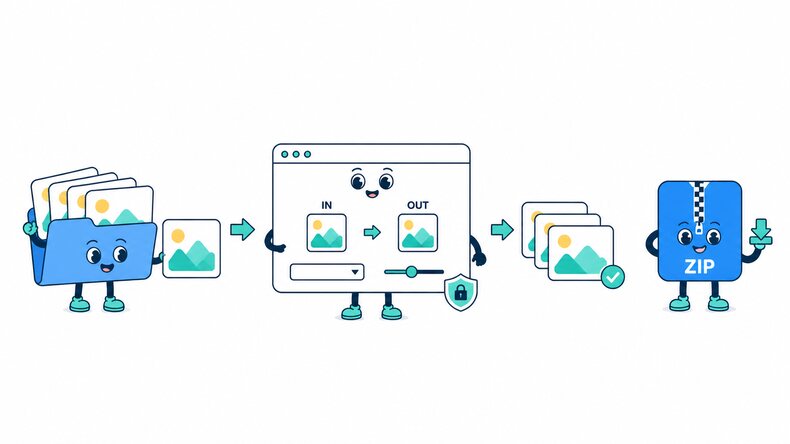
Follow these three simple steps to convert Adobe DNG files to JPG. Add your files, choose the JPG quality, and download the converted images.

Add DNG Files
Select Adobe DNG files, choose an entire folder, or drag and drop multiple files into the browser.

Set JPG Quality
Keep JPG selected and adjust the quality to balance image detail and output file size.

Convert and Download
Start the conversion, review the JPG results, and download files individually or together in a ZIP file.
How Does the DNG to JPG Converter Work?
The CompressFly DNG to JPG converter creates JPG or JPEG copies of supported Digital Negative files directly in your browser. DNG collections can come from cameras, mobile devices, or conversion software, so this page provides a common sharing output for photos with different origins. Files are processed locally, individually or in bulk, without a server upload.
A shared .dng extension does not mean that every file has the same image data or compatibility. Check a sample from each source for resolution, orientation, and color before converting a mixed collection. A JPG is a rendered image rather than a replacement for a DNG editing workflow.
What "in your browser" means
- DNG files are not uploaded to a server
- Conversion runs locally on your device
- JPG results are downloaded directly from your browser
Bulk DNG to JPG Converter Online
Create JPG copies from a DNG collection for a website, shared album, or everyday photo viewer. Process files individually or in bulk, inspect the completed images, and download a ZIP of the results.
For a folder combining phone captures, camera files, and converted DNGs, review each source separately. The same filename extension does not guarantee matching resolution, color, or compatibility.
Why Use CompressFly to Convert DNG to JPG Online?
Fast DNG to JPG Conversion
Convert Adobe DNG files to JPG directly in your browser without waiting for files to upload to or download from a server.
Batch DNG to JPG Conversion
Convert 300+ Adobe DNG files to JPG at once, then download the completed batch as a ZIP file.
No Software Installation
Use the DNG to JPG converter in your browser without installing desktop software or plugins.
Preview Before Downloading
Review each converted JPG image and its output file size before downloading it to your device.
Private & Secure
Your Adobe DNG files are processed locally in your browser and are not uploaded to a server.
Free Access
Use the DNG to JPG converter for free without signing up or entering credit card details.
Related RAW to JPG Conversion Tools
DNG to JPG Converter FAQ
What is a DNG file?
DNG means Digital Negative. It is a publicly documented RAW image format published by Adobe and used by various cameras and mobile capture devices.
How do I convert DNG to JPG online?
Convert Adobe DNG files to JPG online in three steps: 1. Add one or more DNG files or select an entire folder. 2. Keep JPG selected and adjust the output quality. 3. Start the conversion, then download files individually or together in a ZIP file.
Is the DNG to JPG converter free?
Yes. It is free to use, with no daily limits or watermarks. No account or credit card is required.
Can I convert multiple DNG files at once?
Yes. Add Adobe DNG files individually or select an entire folder, apply one JPG quality setting, and download the completed images together in a ZIP file.
How to convert DNG to JPG without losing quality?
A high JPG quality setting limits visible compression changes, but the result is a rendered image rather than a lossless DNG replacement. Keep the DNG for later RAW adjustments and check color and detail in each JPG.
Are camera and phone DNG files equally compatible?
Not necessarily. DNG files can contain different image data even though they share an extension. Test a sample from each camera, phone, or conversion workflow and check the output before processing the rest.
Can the JPG replace my DNG editing file?
A JPG is useful for sharing and viewing, but it does not offer the same RAW editing latitude. Keep the DNG if you plan to revisit exposure, white balance, or other development choices.
Is there a file size limit, and are my DNG files uploaded?
Your DNG files are processed locally in your browser and are not uploaded to a server, so there is no server upload limit. The practical limit depends on your device's available memory and processing power, especially for very large images or batches.