
How to Convert NEF to JPG Online
Follow these three simple steps to convert Nikon NEF photos to JPG. No software installation required.

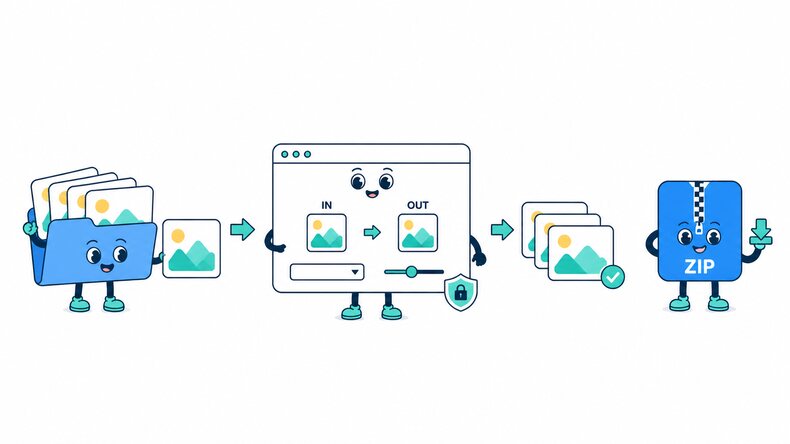
Add NEF Photos
Select Nikon NEF files from your device, add a photo folder, or drag and drop your files into the converter.

Choose JPG Quality
Keep JPG selected as the output format. Use the default quality or adjust it before converting.

Convert and Download
Start the conversion and preview the JPG results. Download selected photos or save the completed batch as a ZIP file.
How Does the NEF to JPG Converter Work?
The CompressFly NEF to JPG converter makes supported Nikon NEF photos easier to open in ordinary photo viewers and share as JPG files. The conversion runs directly in your browser, individually or in bulk, without uploading photos to a server.
Nikon RAW folders may contain NEF or NRW files, and compatibility can differ by camera body and capture settings. Check the actual extension and review the converted dimensions, white balance, and fine detail. If you need the precise look of an edited Nikon RAW photograph, export it from the editing application where those adjustments were made.
What "in your browser" means
- Your NEF files are not uploaded to a server
- Conversion runs locally on your device
- Converted JPG photos are downloaded directly from your browser
Bulk NEF to JPG Converter
Make a Nikon NEF photo session available to family, colleagues, or clients who use standard JPG viewers. Convert photos individually or in bulk and download the completed sharing copies together in a ZIP file.
Preview portraits and photographs with fine texture before sending the set. Check white balance and important details rather than relying on the output file size to judge the result.
Why Use CompressFly to Convert NEF to JPG?
Fast NEF to JPG Conversion
Convert NEF files to JPG directly in your browser without waiting for files to upload to or download from a server.
Batch NEF to JPG Conversion
Convert 300+ NEF files to JPG at once, then download the completed batch as a ZIP file.
No Software Installation
Use the NEF to JPG converter in your browser without installing desktop software or plugins.
Easy to Use
Convert Nikon NEF photos without learning a RAW editing workflow. Add your files and review the JPG results before downloading.
Preview Before Downloading
Review each converted JPG photo and its output file size before downloading it to your device.
Private & Secure
Your NEF files are processed locally in your browser and are not uploaded to a server.
Related Nikon RAW and JPG Tools
NEF to JPG Converter FAQ
How do I convert NEF to JPG online?
Convert NEF to JPG online in three steps: 1. Add your Nikon NEF files or select a photo folder. 2. Keep JPG selected and adjust the quality if needed. 3. Start the conversion, preview the results, and download the JPG files individually or together as a ZIP file.
Is the NEF to JPG converter free?
Yes. The NEF to JPG converter is free to use. No registration or credit card is required.
What is a NEF file?
NEF stands for Nikon Electronic Format. It is a Nikon RAW image format that stores camera image data and settings for later processing, rather than a finished JPG image.
Can I convert NEF to JPEG instead of JPG?
Yes. Choose JPEG as the output format to download .jpeg files. JPG and JPEG use the same image format; only the filename extension differs.
Can I convert multiple NEF files to JPG at once?
Yes. Add multiple Nikon NEF photos or select an entire folder, apply the same JPG quality setting, and download the completed images as a ZIP file.
How to convert NEF to JPG without losing quality?
Higher JPG quality can reduce visible compression changes, but JPG does not retain the Nikon RAW data. Check white balance, shadow detail, and sharp edges in the preview; keep the NEF for later RAW development.
Is a Nikon NRW file the same as a NEF file?
No. They are distinct Nikon RAW formats. Use the NRW to JPG Converter for .nrw files; changing the filename extension does not convert the photo format.
Will the JPG match my edited Nikon photograph?
For the precise result of an edited project, export from the RAW application where you made the adjustments. Before using a browser-converted JPG in a review set, compare its white balance, contrast, and crop with the photograph you intend to share.
Is there a file size limit, and are my NEF files uploaded?
Your NEF files are processed locally in your browser and are not uploaded to a server, so there is no server upload limit. The practical limit depends on your device's available memory and processing power, especially for very large images or batches.