
How to Resize an Image to 1MB in 3 Easy Steps
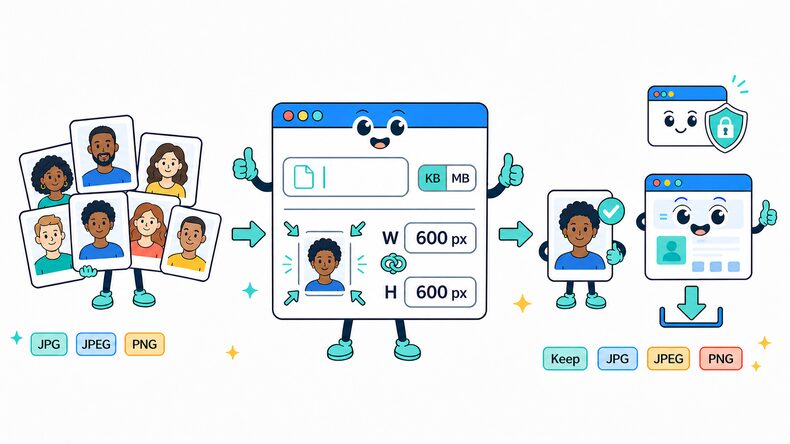
Resize image to 1MB or below with the target already selected. Add JPG, JPEG, PNG, and WebP images individually or in bulk, review the settings, and check the results before downloading.

Add Your Images
Select supported images from your device, choose an entire folder, or drag and drop multiple files into the browser.

Review the 1MB Target
The target is preset to 1MB. Keep it as provided or enter another KB or MB value, then retain the original format or choose JPG, JPEG, PNG, or WebP.

Compress and Download
Start compression, compare the result with the original, then download files individually or save the completed batch as a ZIP file.
What Does Compressing an Image to 1MB Mean?
The 1MB setting limits the output file size to 1MB or below without assigning a fixed image resolution. Large photographs, graphics, and scans may reach this limit through compression, reduced dimensions, or a combination of both.
More file space gives the encoder greater room to retain fine detail, texture, and color than smaller KB targets. The finished image may be below exactly 1MB depending on its original size, format, dimensions, and visual complexity.
When to Use 1MB Images
A 1MB limit is suitable when image quality matters more than aggressive size reduction. It gives detailed photos, scans, and portfolio images more room for on-screen viewing.
Detailed Camera Photos
Reduce a large phone or camera image for online submission while retaining more visible texture and fine detail than a small KB target.
Document or Artwork Scans
Keep small text, line work, and illustrations clearer when the receiving service accepts an image up to 1MB.
Portfolio or Product Images
Create a detailed display copy for a portfolio, catalog, or marketplace without uploading the full-resolution source.
Services With a 1MB Limit
Use this target when a website, client portal, or cloud form explicitly rejects images larger than 1MB.
Why Use CompressFly to Resize Images to 1MB Online?
Smart 1MB Image Compression
Resize image to 1MB or below while keeping as much visible detail as the selected file-size limit allows.
Local Browser Processing
Image compression runs directly in your browser for fast processing, with no software installation required.
Multiple Image Format Support
Compress JPG, JPEG, PNG, and WebP images while keeping the original format or choosing another supported format for the output.
Before-and-After Preview
Compare images before and after processing, then review output quality and file size before downloading.
Private & Secure
Your images never leave your device. All target-size compression happens locally, with no uploads to a server.
Free Access
Resize images to 1MB without signing up, installing software, or entering credit card details.
Related Image Size Tools
Resize Image to 1MB FAQ
How do I resize an image to 1MB?
Resize an image to 1MB in three steps: 1. Keep the preset 1MB target or enter another size, select KB or MB, and choose the output format. 2. Select or drag and drop one or more images, then start processing. 3. Review the results and download files individually or save the completed batch as a ZIP file.
Can I compress an image to 1MB for free?
Yes. Target-size compression is free, with no signup required. The finished size and processing time depend on your image and device.
Will compressing to 1MB affect image quality?
1MB gives detailed photographs and scans more room than the smaller presets, but it does not guarantee lossless output or a print-ready image. Check texture, small lettering, and the final pixel dimensions if the result will be enlarged.
Is a 1MB image suitable for printing?
File size alone cannot tell you. Print suitability depends on pixel dimensions, the intended print size, and visible detail. This tool targets storage size rather than a print resolution; keep a higher-resolution source available if the compressed copy looks soft when enlarged.
What image formats can I compress to 1MB?
You can add JPG, JPEG, PNG, and WebP images. Keep the original format or choose JPG, JPEG, PNG, or WebP for the compressed output.
Can I compress multiple images to 1MB at once?
Yes. Add images individually or select an entire folder, apply the same 1MB target, then download results individually or save the completed batch as a ZIP file.
How many images can I compress at once?
There is no limit on the number of images you can add. Actual batch capacity and processing speed depend on your computer’s available memory and performance, as well as image dimensions and file sizes. For more reliable processing, we recommend up to 300 images per batch.
Are my photos uploaded to a server during compression?
No. Image compression runs locally in your browser, so your files remain on your device and are not uploaded to a server.