
How to Use Lossless Image Compression in 3 Easy Steps
Apply lossless compression to PNG and WebP images without losing quality. Process images individually or in bulk, then review the file-size reduction before downloading.

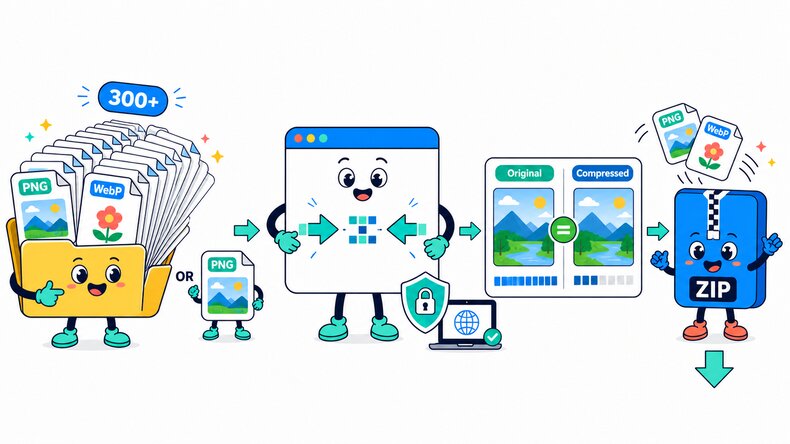
Add PNG or WebP Images
Select files from your device, choose a folder, or drag and drop multiple PNG or WebP images into the browser.

Apply Lossless Compression
Click “Compress” to reduce each file size without losing quality or changing its dimensions.

Review and Download
Compare the original and compressed file sizes, then download an image individually or save the completed batch in a ZIP file.
How Does Lossless Image Compression Work?
The CompressFly lossless image compressor re-encodes PNG and WebP files more efficiently to reduce file size without losing quality or changing image dimensions. Compression runs directly in your browser, individually or in bulk, and your files are not uploaded to a server.
What "lossless" means
- File size is reduced without losing quality
- Image dimensions stay unchanged
- PNG files remain PNG and WebP files remain WebP
- File-size reduction depends on the source image
Free Bulk Lossless Image Compressor Online
Compress 300+ PNG and WebP images at once with our free bulk lossless image compressor. Select individual files or an entire folder, process the batch, compare the original and compressed file sizes, and download all completed images in a ZIP file.
Apply lossless compression to PNG and WebP images directly in your browser without losing quality. Your files remain on your device and are not uploaded to a server. No signup, credit card, or software installation is required.
Why Use CompressFly for Lossless Compression?
Maintain Image Quality
Reduce file size without losing quality in supported formats.
No Settings Required
Start lossless compression without adjusting quality levels or configuring complex options.
Bulk Lossless Compression
Process 300+ supported images at once and download the optimized batch in a ZIP file.
Compare File Size Savings
Compare the original and compressed file sizes before downloading each result.
Private & Secure
Your images never leave your device. Lossless compression runs locally, with no uploads to a server.
Free Access
Use lossless compression without signing up, installing software, or entering credit card details.
Related Lossless Compression Tools
Lossless Compression FAQ
How do I use lossless compression online?
Use this online lossless compression tool in three steps: 1. Upload or drag and drop PNG or WebP images. 2. Click “Compress” to reduce file size without losing quality. 3. Download an image individually or save the completed batch as a ZIP file.
What is lossless image compression?
Lossless image compression reduces file size without losing quality or changing image dimensions. It normally produces a smaller reduction than lossy compression.
What is the difference between lossless and lossy image compression?
Lossless compression reduces file size without losing quality, while lossy compression can create smaller files by removing some image detail. Choose lossless compression when maintaining image quality matters more than achieving the smallest possible output.
Which image formats can I compress losslessly?
This tool supports lossless compression for PNG and WebP images. For optional lossy settings, use the PNG compressor or WebP compressor.
Why is my losslessly compressed image only slightly smaller?
The available reduction depends on the source image and whether it was already optimized. Some PNG and WebP files contain little additional data that can be reduced without losing quality.
Can I use lossless compression for images in bulk?
Yes. Add supported images individually or select an entire folder, apply lossless compression, then download results individually or save the completed batch as a ZIP file.
Are there any limits on lossless image compression?
No. You can compress as many PNG and WebP images as you need, with no maximum file size or daily limits. Very large images or batches may take longer depending on your device.
Are my images uploaded to a server?
No. Lossless compression runs locally in your browser, so your PNG and WebP files remain on your device and are not uploaded to a server.