
How to Compress an ID Photo to KB and Resize It
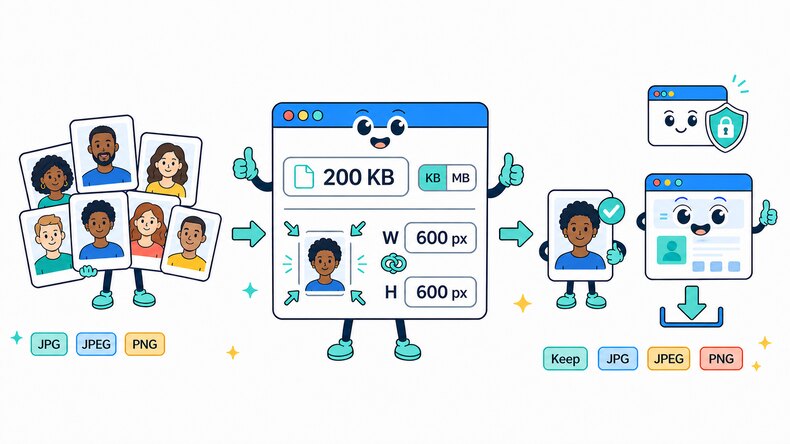
Use this free ID photo compressor and resizer to meet file-size and pixel-dimension limits for passport, registration, and application photos. Process prepared photos individually or in bulk directly in your browser.

Add ID or Passport Photos
Select prepared JPG, JPEG, or PNG photos from your device, choose a folder, or drag and drop files into the browser.

Set the File Size and Dimensions
Enter the required KB or MB limit. If needed, add a width, height, or both in pixels, then keep the original format or choose JPG, JPEG, or PNG.

Review and Download
Start compression, review the photo preview, output file size, and pixel dimensions, then download results individually or together in a ZIP file.
ID Photo Compressor for File Size and Pixel Requirements
Application portals often check both maximum file size and pixel dimensions. Enter the required KB or MB ceiling and optionally set the width, height, or both. CompressFly resizes the photo proportionally before targeting the file-size limit, so the image is not stretched.
Use prepared JPG, JPEG, or PNG photos and keep the source format or choose a different supported output. Processing happens locally in your browser, so you can compress ID and passport photos individually or in bulk for free without server uploads, software installation, or signup.
Why Use CompressFly as an ID Photo Compressor and Resizer?
Target File-Size Limit
Enter the maximum KB or MB size accepted by an application form, registration page, or document portal.
Optional Pixel Resizing
Change the photo width, height, or both when the destination also specifies pixel dimensions.
Aspect Ratio Preserved
Resize the ID photo proportionally to fit within the selected dimensions without stretching the face.
Application-Ready Review
Check the processed photo, resulting file size, and output dimensions before submitting it to a portal.
Bulk Passport Photo Processing
Compress prepared ID and passport photos individually or in bulk, including batches of 300+ files with the same settings.
Private Browser Compression
Sensitive ID photos remain on your device because compression and resizing run locally in your browser.
Related ID Photo Tools
ID Photo Compressor FAQ
How do I compress an ID or passport photo online?
Compress a prepared ID or passport photo in three steps: 1. Enter the target file size in KB or MB and optionally add pixel dimensions. 2. Select or drag and drop photos into the browser, then start compression. 3. Review the file size, dimensions, and preview before downloading the results.
Can I compress an ID photo to a specific KB or MB size?
Yes. Enter the maximum KB or MB value accepted by the destination. CompressFly uses it as the target file-size ceiling, so the result may be smaller than the value rather than exactly equal to it.
Can I resize an ID photo in pixels?
Yes. Enter a width, height, or both. If one field is blank, it is calculated from the original aspect ratio. If both are entered, the photo fits within those dimensions while keeping its proportions.
What file size and dimensions should an ID photo have?
Requirements vary by country, document type, and application portal. Check the destination’s maximum KB or MB size and required pixel dimensions, then enter those limits before processing the photo.
What ID photo formats can I compress and resize?
You can add JPG, JPEG, and PNG photos. Keep Original format to retain the source format, or choose JPG, JPEG, or PNG for the processed output.
Does compressing an ID photo reduce its quality?
It can. Smaller file-size limits usually require stronger compression. Review the processed photo and make sure facial features remain clear before submitting it to an application portal.
Can I compress ID photos in bulk?
Yes. Add prepared ID and passport photos individually or select an entire folder, apply the same file-size and dimension settings, then download results individually or save the completed batch as a ZIP file.
How many ID photos can I compress at once?
There is no limit on the number of ID photos you can add. Actual batch capacity and processing speed depend on your computer’s available memory and performance, as well as photo dimensions and file sizes. For more reliable processing, we recommend up to 300 ID photos per batch.
Are my ID photos uploaded to a server?
No. ID photo compression runs locally in your browser, so your photos remain on your device and are not uploaded to a server.